🔢 Item Data
Introduction
data sets the data components on an item stack — its name, lore, attributes, enchantments, food properties, and everything else that isn't the model or behavior. Most keys under data map directly to vanilla data components, with CraftEngine handling cross-version conversion automatically.
Append #<id> to a data key to apply the same processor multiple times. The #id part is stripped during parsing and only serves to make the key unique:
data:
  insert_lore#1:
    position: TAIL
    lore:
      - "First insertion"
  insert_lore#2:
    position: HEAD
    lore:
      - "Second insertion"
Works with any data key: attribute_modifiers#main, attribute_modifiers#bonus, lore#static, lore#conditional, etc.
🎨 Appearance
item_name
The item's default name, present on all items by default. Unlike custom_name, this cannot be erased by an anvil, is not italicized, and does not display in certain labels such as banner markers or item frames. Alias: display_name.
items:
  demo:sword:
    data:
      item_name: "<!i><#FF8C00>Topaz Sword"
custom_name
A player-assigned name for the item, typically set via an anvil. Has highest priority for display and appears italicized by default.
items:
  demo:sword:
    data:
      custom_name: "<!i><#FF8C00>Topaz Sword"
lore
The item's description lines.
items:
  demo:sword:
    data:
      lore:
        - "What a shiny sword!"
For conditional lines, split text, or priority-based ordering:
lore:
  - content: "Priority 2"
    priority: 2
    operation: APPEND        # APPEND (default) | PREPEND
  - content: "Priority 1"
    priority: 1
  - content: "Split\nThis Line"
    split_lines: true
    conditions:
      - type: permission
        permission: craftengine.admin
Lower priority appears closer to the top. operation defaults to APPEND.
insert_lore
Inserts lines into existing lore at a specific position.
items:
  demo:sword:
    data:
      insert_lore:
        position: AFTER          # HEAD | TAIL | BEFORE | AFTER
        pattern: "Match this"    # Regex for BEFORE/AFTER
        lore:
          - content: "<green>Inserted line"
        fallback:                # Optional — if pattern doesn't match
          position: TAIL
          lore:
            - content: "<red>Fallback"
remove_lore
Removes lines matching a regex.
items:
  demo:sword:
    data:
      remove_lore: "Remove this line"
tooltip_style (1.21.2+)
The tooltip background texture.
items:
  demo:sword:
    data:
      tooltip_style: minecraft:topaz
hide_tooltip
Hides tooltips from specific components. Wraps vanilla minecraft:tooltip_display with cross-version support (formerly HideFlags).
items:
  demo:sword:
    data:
      hide_tooltip:
        - dyed_color
        - enchantments
        - attribute_modifiers
dyed_color
Color for dyeable items (leather armor, etc.).
items:
  demo:armor:
    data:
      dyed_color: 255,128,64
trim
Armor trim pattern and material.
items:
  demo:chestplate:
    data:
      trim:
        pattern: eye
        material: iron
custom_model_data
custom_model_data inside data only sets a plain integer and does not bind models. To link a value to a model definition, configure it at the item root level instead.
# Inside data — sets the component, no model binding
items:
  demo:sword:
    data:
      custom_model_data: 10001

# At item root — sets the component AND binds to model definitions
items:
  demo:sword:
    custom_model_data: 10001
item_model (1.21.2+)
item_model inside data only sets the component value and does not generate models. To link to a model definition and trigger model generation, configure it at the item root level instead.
# Inside data — sets the component, no model generation
items:
  demo:sword:
    data:
      item_model: default:sword

# At item root — sets the component AND triggers model generation
items:
  demo:sword:
    item_model: default:sword
profile
Sets a player head skin. Accepts strings (auto-detected as name, URL, or base64) or a map.
# By player name
profile: XiaoMoMi

# By texture URL
profile: http://textures.minecraft.net/texture/ed83db5c...

# By Base64
profile: eyJ0ZXh0dXJlcyI6...

# Map form (1.20.5+)
profile:
  name: XiaoMoMi       # Player name
  # texture: minecraft:entity/player/slim/alex  # Resource-pack texture path
  # url: https://...    # Texture URL
  # base64: eyJ0ZXh...  # Base64-encoded texture
⚡ Behavior
food (1.20.5+)
Sets the food stats applied when this item is consumed. The item must also have a consumable component to be edible.
items:
  demo:apple:
    material: apple
    data:
      food:
        nutrition: 5
        saturation: 3.5
        can_always_eat: false
equippable (1.21.2+)
Lets the item be worn in an equipment slot.
items:
  demo:helmet:
    data:
      equippable:
        slot: head
        asset_id: minecraft:topaz
        swappable: true
        damage_on_hurt: true
        dispensable: false
| Field | Type | Description |
|---|---|---|
| slot | string | head / chest / legs / feet / body / mainhand / offhand / saddle |
| asset_id | asset path | Equipment model at assets/<ns>/equipment/<id>.json |
| camera_overlay | asset path | Overlay texture at assets/<ns>/textures/<id> |
| swappable | bool | Can be equipped by right-clicking |
| damage_on_hurt | bool | Takes durability damage when the wearer is hurt |
| dispensable | bool | Can be equipped via dispenser |
| equip_on_interact | bool | (1.21.5+) Can be equipped onto a mob by using on it |
use_remainder (1.21.2+)
Replaces this item with the specified remainder when its stack count decreases after use.
items:
  demo:cooked_chicken:
    data:
      use_remainder:
        id: default:chicken_bone
        count: 1               # Optional, default 1
unbreakable
items:
  demo:sword:
    data:
      unbreakable: true
max_damage (1.20.5+)
The item's maximum durability.
items:
  demo:sword:
    material: wooden_sword
    data:
      max_damage: 100
attribute_modifiers
Applies attribute modifiers to the item. Alias: attributes.
items:
  demo:sword:
    data:
      attribute_modifiers:
        - type: attack_speed
          amount: 1.0
          operation: add_value
          id: namespace:custom_attribute   # Optional
          slot: mainhand
enchantment
items:
  demo:sword:
    data:
      enchantment:
        minecraft:sharpness: 3
enchantment:
  merge: true
  enchantments:
    minecraft:sharpness: 3
painting_variant
items:
  demo:painting:
    data:
      painting_variant: default:painting_custom
jukebox_playable (1.21+)
The jukebox song to play when this item is inserted into a jukebox.
items:
  demo:music_stick:
    material: stick
    data:
      jukebox_playable: default:credits_music
block_state
Block state properties applied when placing this item as a block. Also improves placement responsiveness for high-latency players. Alias: blockstate.
# Use detailed vanilla block properties
items:
  demo:sofa:
    material: note_block
    data:
      block_state:
        note: "1"
        powered: "false"
        instrument: "harp"
# Shorthand — copies block state from a defined custom block
items:
  demo:sapling:
    material: oak_sapling
    data:
      block_state: default:palm_sapling[stage=0]
The material must visually match the block state. Use note_block or mushroom_stem instead of paper for block items.
If you have the premium version, you can use client_bound_material + client_bound_data.block_state to improve the client-side experience while keeping the original server-side material:
items: default:palm_planks: material: nether_brick data: item_name: <!i><i18n:item.palm_planks>+ client_bound_material: mushroom_stem+ client_bound_data:+ block_state: default:palm_planks settings: fuel_time: 300 tags: - minecraft:planks - minecraft:wooden_tool_materials model: minecraft:block/custom/palm_planks behavior: type: block_item block: settings: template: default:settings/planks loot: template: default:loot_table/self state:- auto_state: solid+ auto_state: mushroom_stem texture: minecraft:block/custom/palm_planks💾 Stored Data
pdc (Persistent Data Container)
Stores custom key-value data for other plugins to read.
items:
  demo:sword:
    data:
      pdc:
        key: "value"
        number: 42
        list:
          - 1
          - 2
tags / nbt
Low-level NBT access. Sets arbitrary NBT tags on the item. Use @ prefix on keys to flatten nested structures.
items:
  demo:sword:
    data:
      tags:
        CustomTag: "value"
        "@nested.path": 42
written_book_content (1.20.5+)
Sets the content of a written book — title, author, generation, and pages. Apply it to an item whose material is written_book.
items:
  demo:guide_book:
    material: written_book
    data:
      written_book_content:
        title: "Survival Guide"       # Plain string form
        author: XiaoMoMi
        generation: 0                 # 0 = original, 1 = copy of original, 2 = copy of a copy, 3 = tattered
        resolved: false               # Whether the text is already resolved
        pages:
          - "A single-line page"
          - - "First line"
            - "Second line"
          - raw: "<red>Advanced page"
            filtered: "Filtered page" # Shown only to players with chat filter enabled
title also accepts the raw / filtered map form. Text supports MiniMessage formatting, and <arg:...> placeholders are resolved against the build context (e.g. the player viewing the item).
random_values
Rolls random values when the item is built and persists them on the item. Values that already exist on the item are kept, so rebuilding or updating the item never re-rolls them. Each entry accepts any Number Format value.
items:
  demo:sword:
    data:
      random_values:
        attack: 5~10
        crit:
          type: triangle
          min: 0
          max: 100
          mode: 80
Rolled values can be read through chain arguments wherever the item is available as a context parameter, e.g. <arg:item_in_hand.random.attack>, and can drive dynamic attribute modifiers via item.random.attack in number expressions.
function
Executes one or more common functions while the item is being built. This processor does not add a component by itself; it is useful for preparing context variables that later item processors can reuse. functions is the recommended key for a list, while function is an alias that is convenient for a single function.
Processors run in YAML order and share the same item-build context. Put functions after the data it reads and before every processor that consumes its variables. Variables only live for that build pass: if the consumers are under client_bound_data, put the corresponding functions there as well.
The following item stores three independent 0~1 attribute rolls on the server. When it is sent to a player, the function processor calculates a weighted weapon score and exposes only the final result to the client-bound lore:
items:
  demo:rolled_blade:
    material: iron_sword
    data:
      # Stored on the server-side item and never rerolled when it is rebuilt.
      random_values:
        damage_roll: 0~1
        speed_roll: 0~1
        durability_roll: 0~1

    client_bound_data:
      # Damage 50% + speed 30% + durability 20% = a score from 0 to 100.
      functions:
        - type: set_variable
          name: score
          value_type: int
          value: "ROUND(<arg:item.random.damage_roll> * 50 + <arg:item.random.speed_roll> * 30 + <arg:item.random.durability_roll> * 20)"

      insert_lore:
        position: TAIL
        lore:
          - "<!i><gray>Weapon Score: <gold><var:score>"
The three weights add up to 100, so ROUND(...) converts the weighted sum into an integer score from 0 to 100. The order inside client_bound_data is significant: functions must run before insert_lore, and both must be in the same section so they share one context. position: TAIL appends the score after the existing lore. See set_variable for supported value types.
📦 External Data
Inherit data from another plugin's item.
items:
  default:example_item:
    data:
      external:
        plugin: neigeitems       # or "source"
        id: example_item
See External Item Sources for supported plugins.
🧩 Custom Components (1.20.5+)
Your own components — not maintained or version-checked by CraftEngine. Format may break across Minecraft updates. See the data component format on the Minecraft Wiki for the full component reference.
Components
Hold the source item and run /ce debug item-component [component] [json/snbt]. Click the result to copy it, then use the complete (json) ... or (snbt) ... string as that component's value. Keep the format prefix.
★ max_damage

components:
  minecraft:max_damage: 128
★★ food

components:
  minecraft:food:
    nutrition: 4
    saturation: 2.0
    can_always_eat: false
★★ block_state

components:
  minecraft:block_state:
    distance: '1'
    persistent: 'false'
★★★ instrument
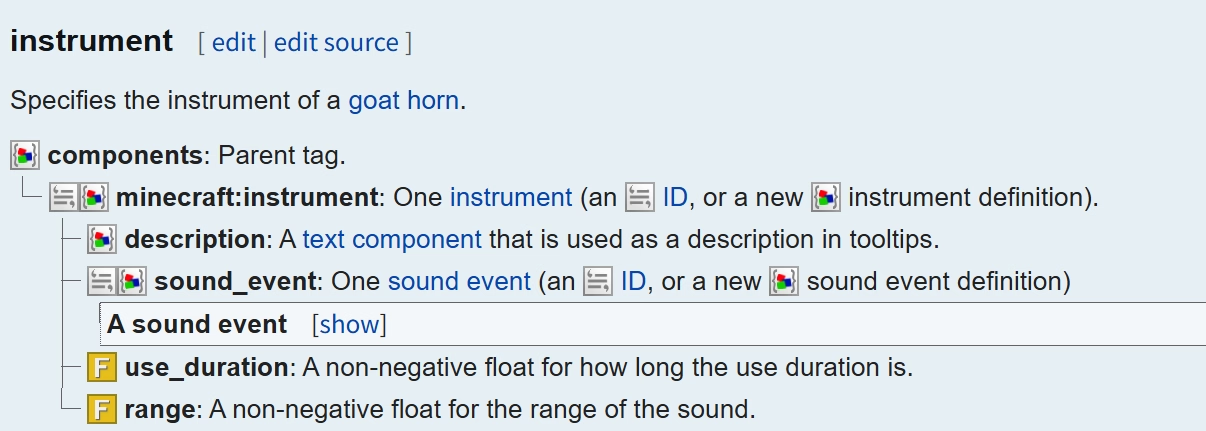
components:
  minecraft:instrument: "seek_goat_horn"
components:
  minecraft:instrument:
    description:
      text: "Custom Instrument"
      color: "red"
    sound_event: minecraft:block.note_block.bell
    use_duration: 1
    range: 16
★★★★ fireworks
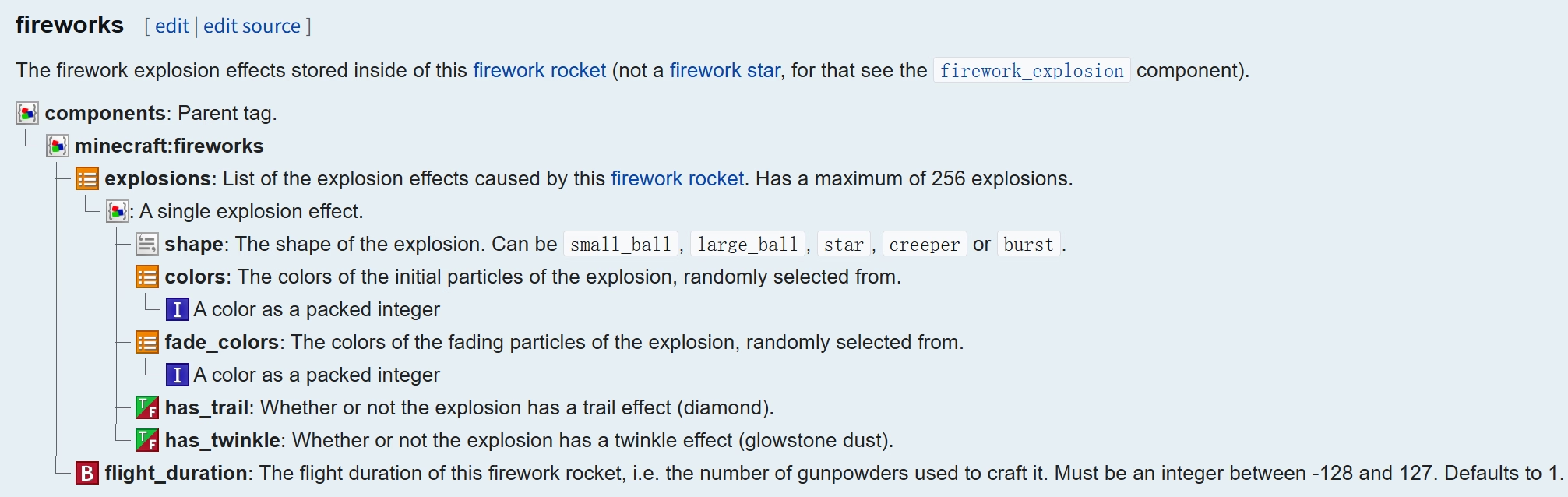
components:
  minecraft:fireworks:
    flight_duration: 3
    explosions:
      - shape: small_ball
        colors: [11223344]
        fade_colors: [0]
        has_trail: true
        has_twinkle: true
When a component needs only to be present (no value):
components:
  minecraft:unbreakable: {}
Remove Components
items:
  demo:item:
    data:
      remove_components:
        - minecraft:equippable
🔀 Conditional
Premium ExclusiveDifferent data based on conditions.
items:
  demo:mythic_sword:
    client_bound_data:
      conditional#1:
        conditions:
          - type: permission
            permission: item.unlock
        data:
          item_name: "Mythic Sword"
          lore:
            - "A blade forged in fallen stars"
      conditional#2:
        conditions:
          - type: "!permission"
            permission: item.unlock
        data:
          item_name: "???? Sword"
📡 Client Bound Data
Premium ExclusiveWhat it is
Normally, everything you put in data lives on the server-side ItemStack — every player sees the same thing, and every plugin reading the item sees all of its components.
client_bound_data moves display-only information off the server. The data is sent through the network protocol and resolved on the client at render time. The server-side item stays lightweight, and different players can see different things.
How it works
Split your data: keep what the server needs in data, put what the player sees in client_bound_data. Any key from data works here — item_name, lore, custom_model_data, item_model, components, etc.
Here is a sword that shows different names and descriptions depending on whether the player has unlocked it:
items:
  demo:mythic_sword:
    material: diamond_sword
    data:
      item_name: "<!i><#FF8C00>Mythic Sword"
    client_bound_data:
      conditional#unlocked:
        conditions:
          - type: permission
            permission: item.mythic_sword.unlock
        data:
          item_name: "<!i><#FF8C00>Mythic Sword"
          lore:
            - "<green>Unlocked"
            - "<gray>Level <arg:player.level>"
      conditional#locked:
        conditions:
          - type: "!permission"
            permission: item.mythic_sword.unlock
        data:
          item_name: "<!i><gray>???? Sword"
          lore:
            - "<red>Locked"
            - "<gray>Requires Level 30"
A player with the permission sees the golden name and their current level. Everyone else sees "???? Sword" and a lock message. Both are looking at the same ItemStack.
Why use it
Different players, different views. Without client_bound_data, every player holding the same item sees identical text. With it, item unlock states, player-specific stats, or real-time counters are all possible — resolved per-client at render time.
Performance. The server-side ItemStack no longer carries complex display components. This matters in three ways:
- Faster
getItemMeta. Other plugins reading item metadata don't need to deserialize display components that only exist on the client. - Lower memory. Survival servers with thousands of stored items benefit from lightweight server-side stacks — the rich data only lives in the rendering pipeline.
- Faster chunk loading. Display components are serialized on the netty thread only when shown to a player. During chunk loads, items carry minimal data.
client_bound_material
Changes the visual material the client sees while keeping the server-side material unchanged.
items:
  demo:palm_planks:
    material: nether_brick
    client_bound_material: mushroom_stem
    client_bound_data:
      block_state: default:palm_planks
Useful when the server-side material must differ from the visual one — for example, using nether_brick as a base while the client renders a block model tied to mushroom_stem.
Overwritable variants
These only take effect when the item doesn't already have the corresponding data — allowing other plugins to set their own values without being overwritten.
# Lore — only shown if no lore is present
overwritable_lore:
  - "Default description"

# item_name — only shown if no custom name is present
overwritable_item_name: "<!i><#FF8C00>Default name"

# item_model (1.21.2+) — only set if no model is present
overwritable_item_model: default:sword

# custom_model_data — only set if no CustomModelData is present
overwritable_custom_model_data: 10001
This feature changes how item data flows between server and client. It is intended for servers that curate their plugin ecosystem and can troubleshoot independently.
- Plugin compatibility. Plugins that identify items by reading server-side names or model values may not recognize items using
client_bound_data. If needed, add a minimal set of real components indataalongside the client-only ones. - Packet conflicts. Other plugins that modify items via packets may strip or corrupt client-side components. This can cause items to visually stick on the cursor (appearing duplicated) or components to become permanently attached.
- Paper obfuscation. If you use Paper's
enable-item-obfuscation, addminecraft:custom_datatodont-obfuscateinpaper-global.yml.
🌐 Override Vanilla Item Data (1.20.5+)
override_data uses the same format and processors as data, but writes the result to the default prototype of a vanilla item. It only works on vanilla item IDs.
This is useful for removing built-in components that would otherwise interfere with a custom system. For example, remove the vanilla attribute modifiers from a diamond chestplate so its built-in armor and armor toughness do not affect the custom attribute system:
items:
  minecraft:diamond_chestplate:
    override_data:
      remove_components:
        - minecraft:attribute_modifiers

    # Recommended: mirror the removal in data sent to the client
    client_bound_data:
      remove_components:
        - minecraft:attribute_modifiers
Changes made by override_data affect only the server-side vanilla item prototype and are not synchronized to clients. Without client_bound_data, the server may have removed a component while the client continues to display its original attributes or tooltip. Mirror client-visible changes with client_bound_data when available.
Components may also be replaced rather than removed. This example changes the default food data for carrots:
items:
  minecraft:carrot:
    override_data:
      food:
        nutrition: 20
        saturation: 20
        can_always_eat: false