🧱 Your First Block
Now make something you can place in the world.
Step 1: the smallest possible block
⬇ Download the topaz block texture and place it at:
resourcepack/assets/tutorial/textures/block/topaz_block.png
Then write the config — inline, everything in one item entry:
items:
  tutorial:topaz_block:
    material: paper
    behavior:
      type: block_item
      block:
        state:
          auto_state: note_block
          texture: tutorial:block/topaz_block
/ce reload all
/ce item get tutorial:topaz_block
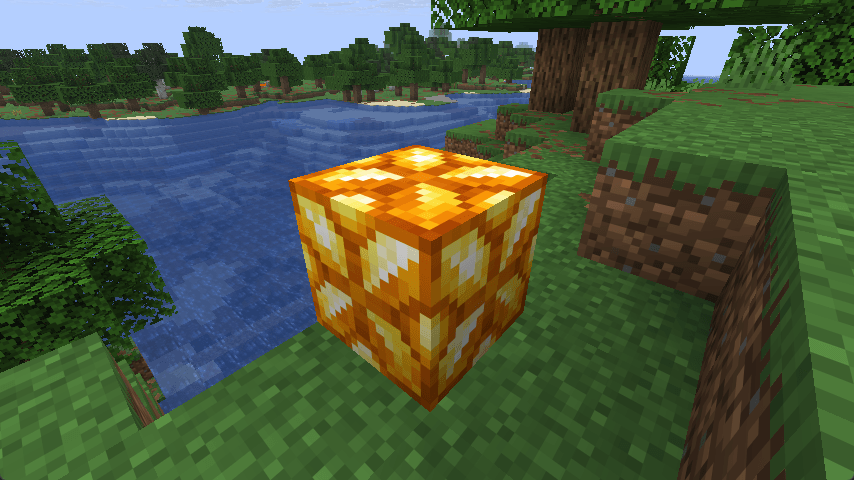
Right-click the ground — your block appears.
What you just wrote
type: block_item— this item places a block on right-clickblock:— everything below defines the block itselfstate— required. What the block looks likeauto_state: note_block— let CraftEngine automatically pick an unused note block state to render your block. Don't worry about which onetexture: tutorial:block/topaz_block— same as with items, auto-generates a cube model with this texture on all six faces
Step 2: make it feel real — hardness & sounds
Right now the block drops nothing and has no custom sounds. Add settings:
items:
  tutorial:topaz_block:
    material: paper
    behavior:
      type: block_item
      block:
        state:
          auto_state: note_block
          texture: tutorial:block/topaz_block
        settings:
          hardness: 4.5
          sounds:
            break: minecraft:block.stone.break
            step: minecraft:block.stone.step
            place: minecraft:block.stone.place
            hit: minecraft:block.stone.hit
            fall: minecraft:block.stone.fall
          tags:
            - minecraft:mineable/pickaxe
hardness: 4.5— how long it takes to break. Higher = longersounds— break, step, place, hit, fall. Format:minecraft:block.<name>.<action>tags: [minecraft:mineable/pickaxe]— tells Minecraft this block needs a pickaxe. With this tag, a pickaxe mines it fast; your fist mines it slowly
Step 3: make it drop itself
Without a loot table, breaking the block drops nothing:
        settings:
          hardness: 4.5
          sounds: ...
          tags:
            - minecraft:mineable/pickaxe
        loot:
          template: default:loot_table/self
default:loot_table/self is a built-in template — just use it for now. Without it, breaking the block gives you nothing.
Step 4: how blocks actually work
Minecraft has a fixed pool of block states — you can't create new ones. CraftEngine "borrows" unused vanilla states and overlays custom models on top. These borrowed states are called visual block states — what players actually see on their client.
auto_state: note_block means: pick an available state from the note block group and use it for this block. States within the same group share the same collision shape.
Common auto_state groups:
| group | source blocks | collision shape | use for |
|---|---|---|---|
| solid | note blocks + mushroom blocks | full cube | 1x1x1 block |
| tripwire | tripwires | thin | crops, small plants, decorations |
| leaves | leaves | full cube | 1x1x1 transparent block |
💡 For most full blocks,
note_blockorsolidis all you need. The other groups are for specific shapes.
Step 5: different ways to write the model
Block models have three forms:
① Single texture → texture: (what you just used)
state:
  auto_state: note_block
  texture: tutorial:block/topaz_block
Auto-generates a cube with the same texture on every face.
② Multiple textures → textures: list
state:
  auto_state: note_block
  model:
    path: tutorial:block/topaz_block      # required with 2+ textures
    textures:
      - tutorial:block/topaz_block_top
      - tutorial:block/topaz_block_side
Texture count determines the model type: 2 → column (top + side), 3 → bottom + side + top. path is required when using multiple textures.
③ Custom parent → generation
state:
  auto_state: note_block
  model:
    path: tutorial:block/topaz_block
    generation:
      parent: minecraft:block/cube_bottom_top
      textures:
        bottom: tutorial:block/topaz_block_bottom
        side: tutorial:block/topaz_block_side
        top: tutorial:block/topaz_block_top
Use when you need a specific parent model. The texture variable names are determined by the parent — look it up on Data Pack Generator before writing them.
⚠️ When using a bare
model:path, ensure texture paths inside the model JSON are correct and point to files undertextures/block/.
Step 6: stop showing paper in the inventory
Your block item currently shows as a piece of paper. The block generates a model from texture: — let the item reference it:
items:
  tutorial:topaz_block:
    material: paper
    model: tutorial:block/topaz_block    # ← add this
    behavior:
      type: block_item
      block: ...
Now the inventory icon shows a miniature version of your block instead of paper.