📍 家具变体
简介
家具至少要定义一个变体。变体决定了家具长什么样、占用多少空间。
变体名称可以自定义,插件本身不作限制。常见的 [ground、ceiling、wall] 只是默认🪑 家具物品行为使用的约定:该行为会根据玩家点击的方块表面选择变体——顶面对应 ground,底面对应 ceiling,侧面对应 wall。
也可以使用其他名称。例如,为电池家具定义 charged、half_charged 和 empty 三个变体,再通过 API 根据电量切换;光传感器则可以在放置时根据当前时间选择 day 或 night 变体。
默认的 furniture_item 只能使用 ground、ceiling、wall 三个名称。想用自定义变体名称,要么注册自己的物品行为,要么放置后用 set_furniture_variant 切换过去。
以下是一个两格高落地灯的完整变体示例:
furniture:
  default:standing_lamp:
    variants:
      ground:
        # 掉落物偏移,防止掉落物生成在方块内部(默认: 0,0,0)
        loot_spawn_offset: 0,0.5,0

        # 家具元素——家具的外观
        elements:
          - type: item_display
            item: default:standing_lamp

        # 家具碰撞箱——家具占用多少空间以及如何与玩家交互
        hitboxes:
          - type: interaction
            width: 1
            height: 2
            blocks_building: true
            interactive: true
元素
元素是组成家具的独立渲染部件。大多数家具只需一个元素;设计较复杂时,可以组合多个元素。例如,全息投影仪可以拆分为底座和投影两个元素:底座保持固定朝向,投影则始终面向玩家。
展示实体通用参数
以下参数适用于 item_display、text_display 和 block_display 三种元素类型。
# 平移、位置与缩放
translation: 0,0.5,0       # 偏移量 (x,y,z),推荐使用此方式调整位置
position: 0.5,0,0          # 绝对位置 (x,y,z)
scale: 1,1,1               # 缩放 (x,y,z),也支持单个数字如 scale: 1.5

# 旋转(推荐使用 rotation)
yaw: 0                     # 绕 Y 轴旋转
pitch: 0                   # 绕 X 轴旋转
rotation: 45               # 基于 Y 轴旋转
rotation: 45,45,0          # 欧拉角,见下方旋转工具
rotation: 0,0,0.707,0.707  # 四元数,见下方旋转工具

# 展示
billboard: fixed           #      fixed      /  vertical   /  horizontal /         center
                           # 固定垂直和水平轴 /  固定垂直轴  /  固定水平轴  / 按照中心旋转跟随玩家视角
glow_color: 255,255,255    # 发光边框颜色 (R,G,B)
brightness:                # 渲染亮度值
  block_light: 15
  sky_light: 15
view_range: 1.0            # 可视距离系数

# 阴影
shadow_radius: 0           # 阴影半径
shadow_strength: 1         # 阴影的不透明度
建议使用 translation 代替 position,使用 rotation 代替 yaw/pitch。这样插件可以在不发送位置同步包的情况下更新渲染,保证最佳视觉效果。
position 改的是实体坐标,translation 是在坐标不动的前提下偏移实体位置。
如果家具的 wall 或 ceiling 变体中的元素的 position 选项是 0,0,0 时,实体可能会出现发黑的问题。可以给 position 一个微小偏移,再用反向的 translation 拉回原位:
wall:
  elements:
    - type: item_display
      item: default:my_furniture
      position: 0,0,0.5        # 从墙面推出半格
      translation: 0,0,-0.5    # 拉回来,确保渲染位置正确
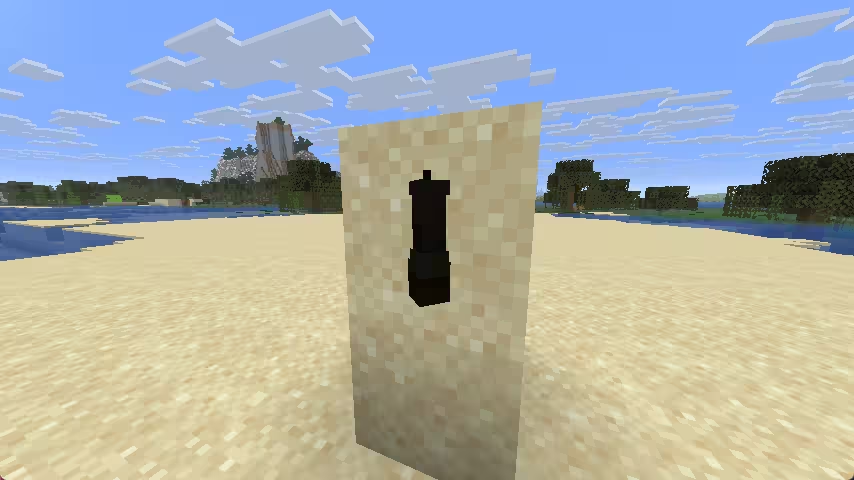
物品展示实体
https://zh.minecraft.wiki/w/展示实体
必填参数
type: item_display
item: default:bench
可选参数
display_transform: none # none  / third_person_left_hand / third_person_right_hand
                        # 不变换 /   第三人称视角左手变换  /   第三人称视角右手变换
                        # first_person_left_hand / first_person_right_hand
                        #   第一人称视角左手变换  /   第一人称视角右手变换
                        #         head         /        gui        /     ground     /  fixed  /    on_shelf
                        # 放置在头部物品栏的变换 / 在图形界面中的变换 / 平铺在地面的变换 / 默认变换 / 在展示架中的变换
copy_data:
  - minecraft:dyed_color
更多参数参见展示实体通用参数。
display_transform 决定物品模型的变换方式。大多数情况下保持默认为 none 即可。
使用 copy_data 可以把家具源物品的指定组件复制到渲染物品(示例见下方物品实体)。tint_source 仍作为旧写法的别名保留。
文本展示实体
https://zh.minecraft.wiki/w/展示实体
必填参数
type: text_display
text: 你好 <papi:player_name>
可选参数
line_width: 200
background_color: 64,0,0,0 # ARGB
text_opacity: -1
has_shadow: false
is_see_through: false
use_default_background_color: false
alignment: center  # center / left  / right
                   #  居中  / 左对齐 / 右对齐
更多参数参见展示实体通用参数。
方块展示实体
基于原版方块展示实体渲染一个原版方块。
必填参数
type: block_display
block: minecraft:stone              # 方块状态字符串,可为方块 ID 或完整状态,如 minecraft:chest[facing=north]
更多参数参见展示实体通用参数。
物品实体
基于物品实体渲染自定义物品
必填参数
type: item
item: default:bench
position: 0,1,0
# 从家具源物品复制渲染物品需要的组件。
copy_data:
  - minecraft:dyed_color
  - minecraft:map_color
  - minecraft:firework_explosion
  - minecraft:potion_contents
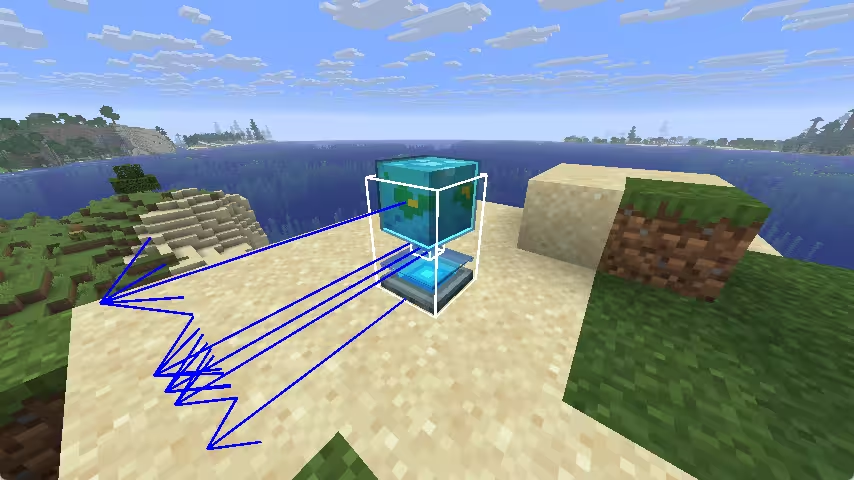
盔甲架
基于盔甲架渲染自定义物品
type: armor_stand
item: default:bench
position: 0,1,0
pitch: 0.0
yaw: 0.0
scale: 1
small: false
glow_color: white  # black, dark_blue, dark_green, dark_aqua, dark_red, dark_purple, gold, gray, dark_gray, blue, green, aqua, red, light_purple, yellow, white
# 从家具源物品复制渲染物品需要的组件。
copy_data:
  - minecraft:dyed_color
  - minecraft:map_color
  - minecraft:firework_explosion
  - minecraft:potion_contents
BetterModel
通过 BetterModel 渲染自定义模型
必填参数
type: better_model
model: custom_model # 指定要渲染的模型
可选参数
position: 0,0,0
yaw: 0
pitch: 0
sight_trace: true
tints:
  source: minecraft:dyed_color
  bones:
    - body
  children: true
tints.source 从家具源物品读取颜色;bones 指定需要着色的 BetterModel 骨骼;children 决定是否同时包含其子骨骼。
如果家具源物品包含玩家 profile 组件,CraftEngine 会自动把它应用到 BetterModel 模型,无需额外配置 profile。旧版服务端则读取 SkullOwner。
ModelEngine
通过 ModelEngine 渲染自定义模型
必填参数
type: model_engine
model: custom_model # 指定要渲染的模型
可选参数
position: 0,0,0
yaw: 0
pitch: 0
碰撞箱
碰撞箱决定家具占用的空间和交互范围,例如玩家能否穿过以及可以点击的位置。插件内置了多种类型,可按需选用。
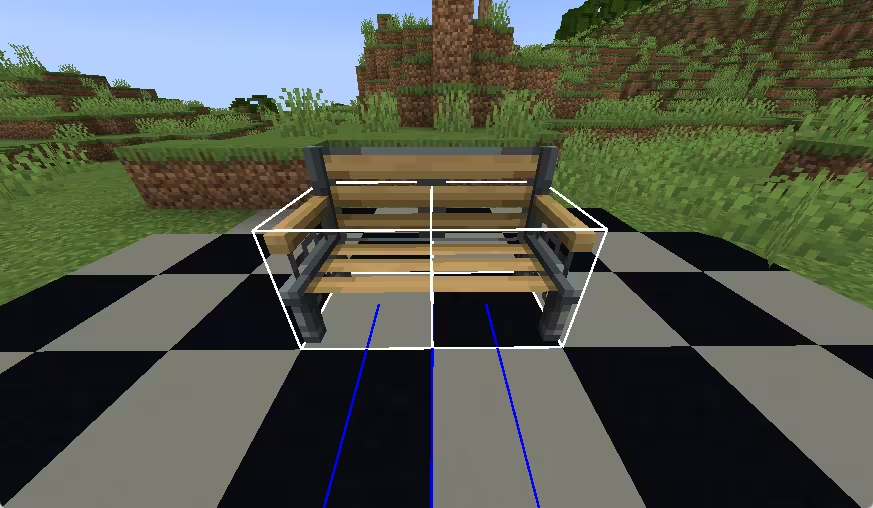
输入 /ce debug furniture 开启家具调试模式。所有碰撞箱都会以线框显示,便于检查位置和大小;错位或穿模的碰撞箱会被高亮标记。
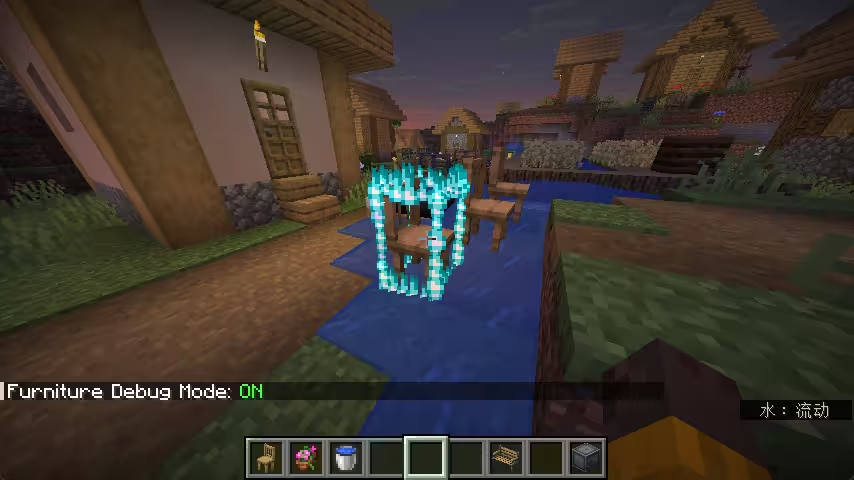
调试模式下可见碰撞箱
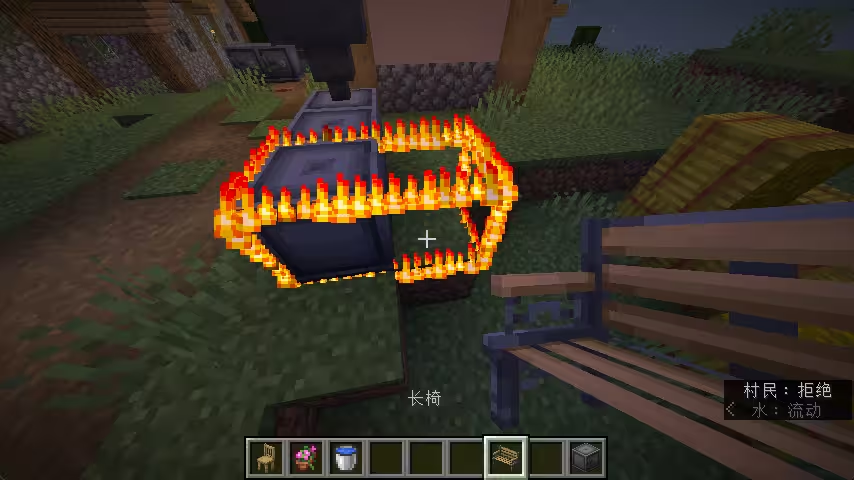
错误放置被高亮
交互实体
实体和玩家可以穿过。用于点击检测、座位、阻挡放置,不产生物理碰撞。
type: interaction
position: 0,0,0
width: 1                         # 或使用 scale: 1,2 作为宽 × 高的简写
height: 2                        # 同上
interactive: true                # 玩家是否可以交互(默认: true)
blocks_building: true            # 是否阻止方块放置(默认: true)
can_use_item_on: true            # 是否对其使用物品(默认: true)
can_be_hit_by_projectile: true   # 是否可以反弹弹射物(默认: true)
invisible: false                 # 是否通过 F3+B 可见(默认: false)
seats:
  - 0,0,-0.1 0
潜影贝
实体和玩家无法穿过。
type: shulker
position: 1,0,0
scale: 1                          # 尺寸乘数(默认: 1)
peek: 0                           # 潜影贝壳打开的高度,0~100(默认: 0)
direction: UP                     # up / down / north / west / east / south
interaction_entity: true          # 额外生成交互实体,提升点击精度
interactive: true                 # 玩家是否可以交互(默认: true)
blocks_building: true             # 是否阻止方块放置(默认: true)
can_use_item_on: true             # 是否对其使用物品(默认: true)
can_be_hit_by_projectile: true    # 是否可以反弹弹射物(默认: true)
invisible: false                  # 是否通过 F3+B 可见(默认: false)
seats:
  - 1,0,-0.1 0
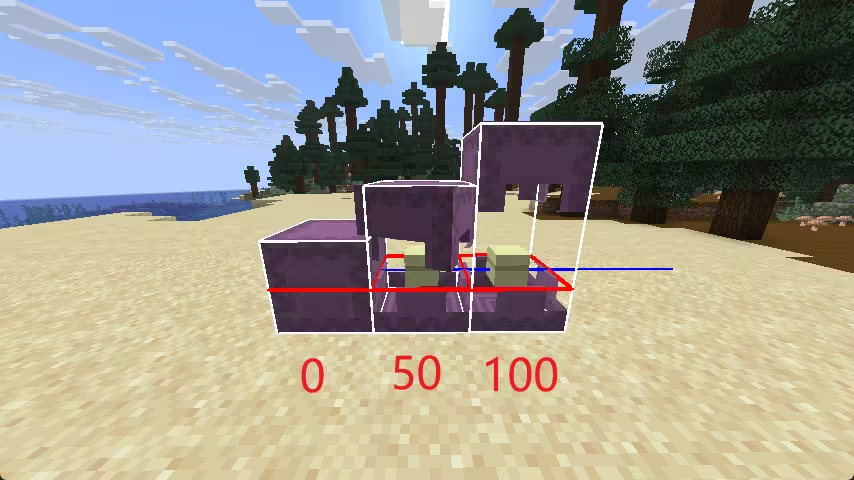
peek: 0 peek: 50 peek: 100
快乐恶魂
更大的碰撞箱(scale=1 时占用 4×4×4 格)。实体和玩家无法穿过。
type: happy_ghast
position: 1,0,0
scale: 0.25                       # 尺寸乘数(默认: 1)
blocks_building: true             # 是否阻止方块放置(默认: true)
can_use_item_on: true             # 是否对其使用物品(默认: true)
can_be_hit_by_projectile: true    # 是否可以反弹弹射物(默认: true)
seats:
  - 1,0,-0.1 0
自定义
使用任意原版实体类型与玩家碰撞。默认使用 slime。
type: custom
position: 1,0,0
scale: 5                          # 生物的尺寸乘数
entity_type: slime                # 任意原版实体 ID,如 minecraft:creeper
blocks_building: true             # 是否阻止方块放置(默认: true)
can_use_item_on: true             # 是否对其使用物品(默认: true)
can_be_hit_by_projectile: true    # 是否可以反弹弹射物(默认: true)
seats:
  - 1,0,-0.1 0
座位格式:x,y,z [yaw] [force_player_rotation],角度均相对家具朝向计算。
yaw:座位朝向,默认0。填写时限制身体旋转,省略时可自由旋转。force_player_rotation:入座时调整视角一次,保留俯仰角。true跟随yaw;数值使用自定义角度(包括0);false或省略则不调整。
seats:
  - 0,0,-0.1           # 自由旋转
  - 1,0,-0.1 90        # 限制身体旋转,不调整视角
  - 2,0,-0.1 90 true   # 同时将视角转向 90°
  - 3,0,-0.1 90 45.5   # 改为将视角转向 45.5°
使用配置段写法可单独控制身体旋转限制:
seats:
  - position: 0,0,-0.1
    yaw: 90
    limit_player_rotation: false  # 填写 yaw 时默认 true,否则默认 false
    force_player_rotation: true
一个碰撞箱可设置多个座位,不同碰撞箱中位置重叠的座位会合并为一个。
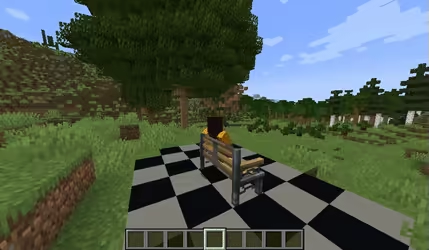
0,0,0 0
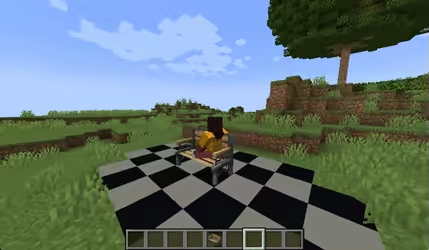
0,0,0
实体剔除
付费版专属实体剔除会在玩家看不到家具时自动隐藏它,降低客户端渲染线程的开销。默认开启。
为某个变体关闭:
ground:
  entity_culling: false
详细调整:
ground:
  entity_culling:
    aabb: -0.5,0,-0.5,0.5,2,0.5    # 剔除包围盒(minX,minY,minZ,maxX,maxY,maxZ)
                                   # 默认自动计算
    view_distance: 64              # 最大可视距离,-1 表示无限距离
    aabb_expansion: 0.25           # 包围盒扩展量(默认: 0.25)
    ray_tracing: true              # 是否启用光线追踪剔除(默认: true)
外部模型
变体可以引用外部插件的模型(例如 BetterModel、ModelEngine,或通过 API 注册的来源)。
furniture:
  default:bench:
    variants:
      ground:
        blueprint: blueprint_id    # 外部插件的模型 ID