🐚 命令
CraftEngine 的大部分命令以 /craftengine(缩写 /ce)开头,少数为独立的玩家命令(如 /search-recipe、/search-usage)。每条命令的启用状态、权限节点与命令路径都记录在 plugins/CraftEngine/commands.yml 中,可在其中自由修改(修改后需重启生效)。多数命令支持 --silent(简写 -s)标志以静默执行、不回显消息。
下文中 [ ] 表示必填参数,( ) 表示可选参数。
基础命令
reload
/ce reload (config/recipe/host/pack/all)
不带参数时默认为 config。
| 参数 | 行为 |
|---|---|
config | 重载配置,包括工作流定义、触发条件和步骤。 |
recipe | 重载配置与配方,同时更新工作流定义。 |
host | 重载配置及资源包托管设置,包括 resource-pack.packs 和 resource-pack.self-host。 |
pack | 执行当前已加载、trigger 包含 reload_pack 的工作流。 |
all | 重载配置、配方、托管设置和工作流定义,然后执行 reload_pack 工作流。 |
修改 resource-pack.workflows 后,执行 /ce reload 或 /ce reload config 即可更新。/ce reload pack 使用已加载的工作流,不会重新读取配置。是否生成、上传或发送资源包,取决于被触发工作流中的步骤。
workflow
/ce workflow [名称]
执行 resource-pack.workflows 中指定的工作流,例如 /ce workflow default。Tab 补全列出已加载的工作流。
步骤字段和完整示例见资源包工作流,包定义及发送规则见资源包托管。
按顺序执行工作流中配置的步骤,即使没有设置 trigger 也能手动执行。trigger 支持字符串或列表,例如 trigger: reload_pack 或 trigger: [reload_pack]。
仅上传不会自动重发;需要向当前使用指定包的在线玩家发送更新时,应添加 send_pack 步骤。步骤中的 pack 必须对应 resource-pack.packs 中的包 ID。
pack
/pack [enable/disable/reset] [包ID]
保存自己的资源包偏好。包 ID 对应 resource-pack.packs 中的条目。
enable:显式启用该包。disable:显式禁用该包。reset:删除偏好覆盖,恢复使用该包配置中的default值。
仅限玩家执行,需要 ce.resourcepack.pack.<包ID> 权限,Tab 补全只列出有权限的包。管理员修改其他玩家的偏好使用下文的 feature pack-preference。
修改在线玩家对本服已配置包的偏好后,会重新发送该玩家选中的资源包。本服未配置的包 ID 也可以保存偏好并更新缓存,但不会触发重发。离线玩家的数据会在下次选择资源包时使用。
/pack enable default
/pack disable default
/pack reset default
pack preset
/pack preset [名称]
为自己应用 resource-pack.presets 中的预设,仅限玩家执行。
resource-pack:
  presets:
    high: [A, B, C]
    low: [A]
修改后执行 /ce reload,使用 /pack preset high 或 /pack preset low 切换。包 ID 对应 resource-pack.packs。选中预设中的包会启用,packs 或任意预设中其余包会禁用,与这些配置无关的已保存偏好会保留。空列表表示关闭所有受预设管理的包。
需要 ce.resourcepack.preset.<名称> 权限来使用整个预设,Tab 补全列出有权限使用的预设。管理员为其他玩家应用预设使用下文的 feature pack-preset。
偏好会一次保存,在线玩家的选择发生变化时只更新一次资源包;离线玩家下次进服时使用已保存的偏好。应用预设会复制当时的选择,之后修改预设需要重新应用。
clean-cache
/ce clean-cache [类型]
清理自动分配的缓存数据。可用类型:custom_model_data、custom_block_states、visual_block_states、font、all(默认)。插件重载时不可执行。
物品命令
item browser
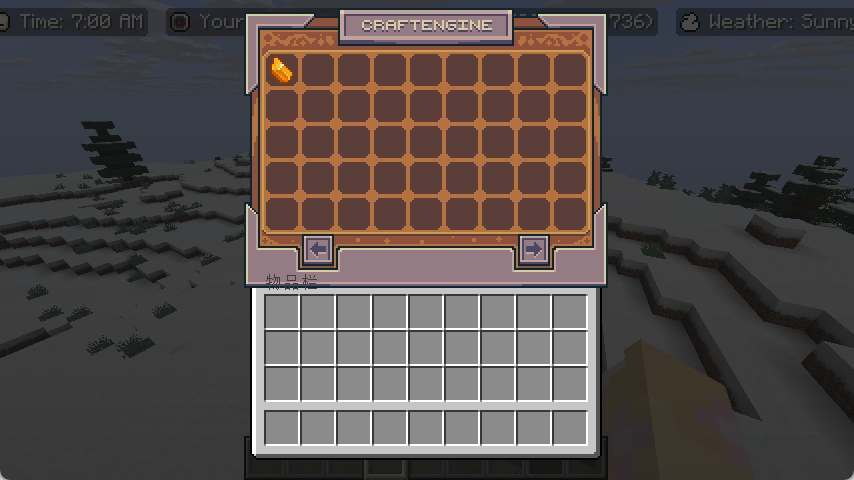
/ce item browser [玩家]
为指定玩家打开物品浏览器(管理端)。
/ce
玩家可直接输入 /ce 为自己打开物品浏览器(快捷方式)。
item get
/ce item get [物品标识符] (数量)
获取指定数量的物品(1–9999,默认 1)。
item give
/ce item give [玩家] [物品标识符] (数量)
给予玩家指定数量的物品。
item clear
/ce item clear [玩家] [物品标识符] (最大数量)
移除玩家物品栏中匹配的 CraftEngine 物品。最大数量 为 0 时仅统计不删除。可用 --match-tag 标志按物品标签匹配。
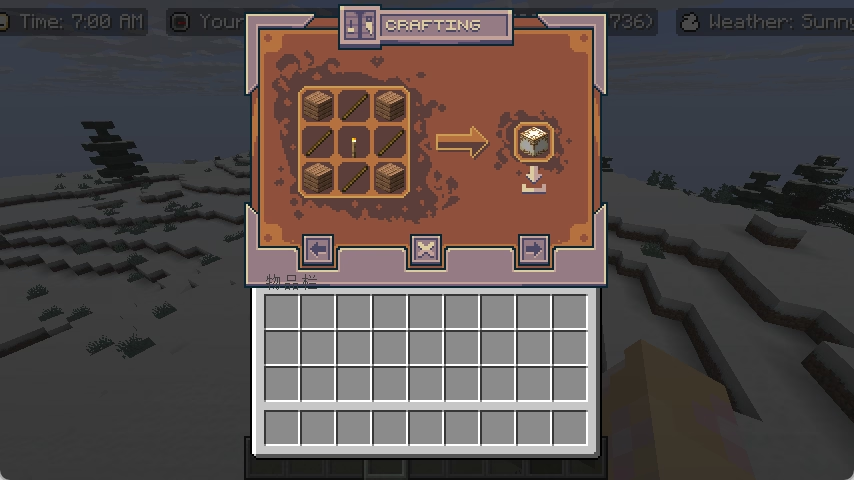
item search-recipe / search-usage
/ce item search-recipe [玩家] [物品标识符]
/ce item search-usage [玩家] [物品标识符]
为指定玩家打开物品的配方/用途查询界面。
/search-recipe [物品标识符]
/search-usage [物品标识符]
玩家查询自身物品的配方/用途。
item component add
/ce item component add [组件] [SNBT]
为主手物品添加或覆盖数据组件(仅玩家,1.20.5+)。
组件使用 minecraft:damage 等 ID,Tab 补全列出当前服务端已注册的组件 ID。值必须符合当前服务端版本中该组件的 SNBT 格式。直接输入组件值,无需添加 (snbt) 前缀或在外层包裹组件 ID。根据组件的格式,可以输入字符串、数字、列表或复合标签,支持包含空格的值。
/ce item component add minecraft:damage 5
/ce item component add minecraft:custom_data {note:"Hello world",level:1}
未知组件或无效值会返回错误提示,不会应用修改。添加已存在的组件时会替换整个组件值,复合标签不会与原值合并。
在 1.21.2+ 设置物品模型可使用 /ce item component add minecraft:item_model "minecraft:diamond_sword"。自定义模型数据通过 minecraft:custom_model_data 组件设置,值需使用当前服务端版本支持的 SNBT 格式。
item component remove
/ce item component remove [组件]
移除主手物品上指定的数据组件,也可以移除物品类型默认提供的组件(仅玩家,1.20.5+)。
/ce item component remove minecraft:custom_data
item component reset
/ce item component reset [组件]
将指定组件恢复为物品类型的默认值(仅玩家,1.20.5+)。如果物品类型没有该组件的默认值,则移除该组件。此命令只重置指定组件,不会重置整个物品,也不是撤销上一次命令。
/ce item component reset minecraft:damage
以上三条组件命令均要求主手持有物品,并支持组件 ID 的 Tab 补全。它们取代了旧的 item custom-model-data、item item-model 和 item remove-component 命令,旧命令已不可用。
功能命令
feature pack-preference
/ce feature pack-preference [玩家] [enable/disable/reset] [包ID] (--silent)
为选中的玩家设置资源包偏好。需要 ce.command.admin.pack_preference 权限,无需单个包的玩家权限。目标必填,支持在线玩家名或玩家选择器,例如 @a、@p。
feature pack-preset
/ce feature pack-preset [玩家] [预设] (--silent)
为选中的玩家应用预设。需要 ce.command.admin.pack_preset 权限,无需单个预设的玩家权限。目标必填,支持在线玩家名或玩家选择器,例如 @a、@p。
feature send-pack
/ce feature send-pack [玩家]
根据指定玩家的已保存偏好及各包的 default 设置,重新发送其选中的资源包。资源包按配置顺序发送,尚不可用的包无法发送。此命令不负责生成或上传资源包。
feature totem-animation
/ce feature totem-animation [玩家] [物品标识符] (音效) (音量) (音高) (最小音量) (最小音高)
为玩家播放不死图腾动画。可用 --no-sound 标志静音。
feature toast
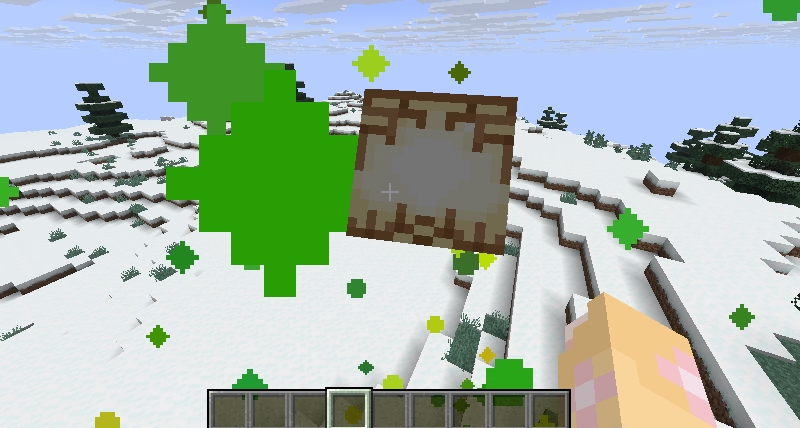
/ce feature toast [类型] [物品] [消息]
给自己发送一个弹窗(成就提示,仅玩家)。类型 为弹窗框样式:task、challenge 或 goal;物品 为图标(命名空间物品标识符);消息 为显示文本,支持 MiniMessage。可用 --silent(-s)标志静默执行。
feature locale
/ce feature locale set [玩家] [区域设置]
设置玩家的语言区域。
/ce feature locale unset [玩家]
取消玩家的语言区域设置。
feature toggle-entity-culling
/ce feature toggle-entity-culling [玩家] (状态)
开启/关闭玩家的实体剔除。状态 为 true/false,省略则切换。
feature entity-culling-distance-scale
/ce feature entity-culling-distance-scale set [玩家] [缩放比率]
设置玩家的实体剔除距离缩放比率(0.125–8)。
feature display-entity-view-distance-scale
/ce feature display-entity-view-distance-scale set [玩家] [缩放比率]
设置玩家的展示实体可视距离缩放比率(0.125–8)。
feature place-feature
/ce feature place-feature [特性标识符] (位置)
在指定位置放置原版已配置特性(configured feature,仅玩家)。省略位置时使用玩家当前坐标。
feature migrate-world-storage
/ce feature migrate-world-storage [世界] [方向] [类型]
迁移世界区块存储格式。类型 为 mca、pdc 或 linear,且不能是配置文件中当前启用的存储类型。方向 为 from 或 to:
from:从指定类型迁移到当前启用的存储类型——请先在配置中切换目标存储类型,再从旧类型迁移。to:从当前启用的类型迁移到指定类型,完成后会提示你在配置中更新存储类型并重启服务器。
仅支持 Paper,同一时间只能运行一个迁移任务。
feature clear-world-storage
/ce feature clear-world-storage [世界] [类型]
删除指定世界中某种存储类型的区块数据。类型 为 mca、pdc 或 linear,且不能是配置文件中当前启用的存储类型。用于切换存储格式后清理遗留数据(例如在执行 migrate-world-storage 之后)。仅支持 Paper,同一时间只能运行一个清理任务。
feature world-settings
/ce feature world-settings [世界] [设置项] (值)
查询或设置世界选项。值 为 true/false/default,省略则查询当前值。
资源命令
resource list
/ce resource list
列出 resources 文件夹下所有包(含启用/禁用状态)。

resource enable
/ce resource enable [包名]
启用指定资源包(写入其 pack.yml)。
resource disable
/ce resource disable [包名]
禁用指定资源包。
resource create
/ce resource create [包名] (命名空间) (作者) (描述)
创建新的资源包骨架。未指定命名空间时使用包名作为命名空间。
resource save-default
/ce resource save-default [路径]
重新生成内置默认资源。可用路径:/default_assets、/default_feature_populator、/default_templates、/internal、/legacy_armor、/remove_shulker_head。
resource search
/ce resource search [类型] [资源]
查找某个资源配置定义在哪个文件中。类型 为资源的配置类型(如 craftengine:item、craftengine:block)——Tab 补全会列出所有可搜索的类型,选定类型后会列出其已注册的标识符。输出相对于 resources 文件夹的文件路径,点击即可复制绝对路径到剪贴板。
调试命令
debug pack-states
/ce debug pack-states (玩家)
查看在线玩家已缓存的资源包偏好。省略玩家时查询自己,控制台必须指定玩家。
| 状态 | 颜色 | 含义 |
|---|---|---|
enabled | 绿色 | 玩家已显式启用。 |
disabled | 红色 | 玩家已显式禁用。 |
unset | 黄色 | 尚未保存覆盖值,使用该包配置中的 default。 |
展示所有已保存的包 ID,包括本服未配置的包;不存在的包名以删除线标记,例如 old_pack,仍显示其保存的状态。本服已配置但没有偏好覆盖的包也会列出。偏好尚未加载时,会显示相应提示。
这里显示的是偏好状态,不代表客户端已经下载或加载成功。
debug visual-state-usage
/ce debug visual-state-usage [方块类型]
别名:/ce debug appearance-state-usage、/ce debug clientside-state-usage
获取指定方块类型的客户端外观方块状态使用情况。红色表示手动分配状态,黄色表示自动分配状态,绿色表示可用状态。将鼠标悬停在对应区域可查看具体状态。
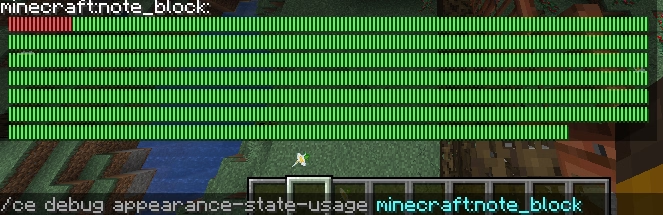

被手动分配占用的外观方块状态

被自动分配占用的外观方块状态
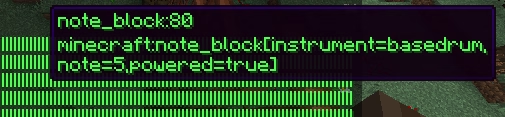
未被占用的方块状态
debug auto-state-usage
/ce debug auto-state-usage [状态组]
获取指定自动状态组(auto state group)的分配使用情况。颜色含义与 visual-state-usage 相同。
debug real-state-usage
/ce debug real-state-usage
别名:/ce debug serverside-state-usage
检查服务端真实方块状态的使用情况。不带参数。
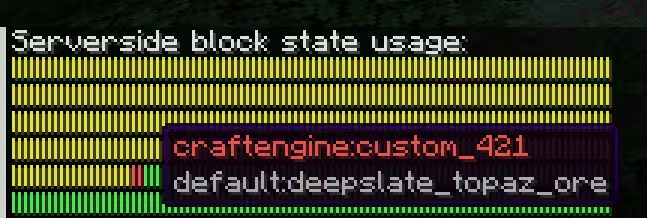
被手动分配占用的真实方块状态

被自动分配占用的真实方块状态

未被占用的方块状态
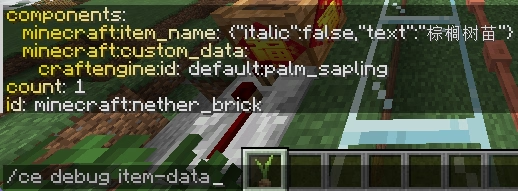
debug item-data
/ce debug item-data
别名:/ce item debug
检查主手物品的物品数据(如 NBT 或组件)。可用 --client-side 标志查看经过客户端转换(含解密)后的数据。
debug item-component
/ce debug item-component [组件] [json/snbt]
将主手物品的指定数据组件序列化为 JSON 或 SNBT(仅玩家,1.20.5+)。结果包含 CraftEngine 所需的 (json) 或 (snbt) 前缀;点击结果即可将完整字符串复制到剪贴板。
例如,/ce debug item-component minecraft:custom_name snbt 返回的值可以直接粘贴到配方的精准匹配谓词或物品的直接组件配置中。
debug get-block-internal-id
/ce debug get-block-internal-id [方块状态]
获取自定义方块状态对应的服务端真实方块命名空间 ID,常用于 WorldEdit 和数据包等工具。


问: 为什么 Minecraft 原生数据包中必须使用真实方块命名空间 ID,例如 craftengine:custom_666,而不是像 default:palm_log 这样的名称?
答: 因为配置文件在服务器启动后才加载,而数据包在服务器初始化阶段就已加载。此时服务器无法识别未注册的方块命名空间 ID。为确保预注册的自定义方块能适配最新用户配置,CraftEngine 采用了容器式动态绑定方案。
debug get-block-state-registry-id
/ce debug get-block-state-registry-id [方块状态]
获取对应方块状态的注册 ID(不常用)。

debug target-block
/ce debug target-block [--this]
检查鼠标指向的方块数据(或使用 --this 标志获取玩家当前位置)。包括真实方块状态、外观状态、名称、行为、方块实体信息以及自定义标签等。

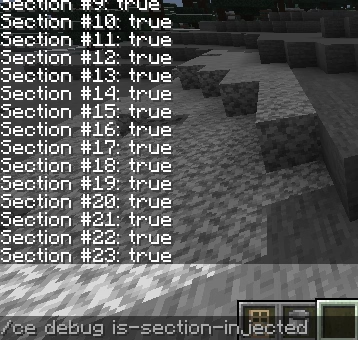
debug is-section-injected
/ce debug is-section-injected
检查玩家所在区块的各区块段是否已被注入。返回值为 false 表示存在异常情况,需要进行调查。
debug setblock
/ce debug setblock [位置] [方块状态]
在指定位置放置 CraftEngine 方块状态。
debug spawn-furniture
/ce debug spawn-furniture [位置] [家具标识符] (变体)
在指定位置放置家具,可选指定变体。
debug clear-cooldown
/ce debug clear-cooldown [玩家]
清除玩家的物品冷却。
debug is-chunk-persistent-loaded
/ce debug is-chunk-persistent-loaded
检查玩家所在区块是否被强加载(Folia 不可用)。
debug entity-id
/ce debug entity-id [世界] [实体 ID]
通过实体 ID 获取实体数据。
debug custom-model-data
/ce debug custom-model-data (物品标识符)
获取物品的自定义模型数据值。省略标识符时使用主手物品。
debug item-model
/ce debug item-model (物品标识符)
获取物品的物品模型值(1.21.2+)。省略标识符时使用主手物品。
debug image
/ce debug image [图片标识符] (行) (列)
获取指定图片在字体中的引用方式(含 MiniMessage、MineDown、RAW 三种格式)。

debug furniture
/ce debug furniture
切换玩家的家具调试模式,用于可视化家具的边界与组成(仅玩家)。
debug optimize-furniture-structure
/ce debug optimize-furniture-structure [世界] [文件] (y轴偏移量)
优化结构存储文件中的家具:移除其中的碰撞实体,并按偏移量调整家具的 Y 坐标。